
Blogs
Online Menu Approval for Catering: How Jucas Lets Clients Finalise Menus Without a Single Phone Call
Online Menu Approval for Catering: How Jucas Lets Clients Finalise Menus Without a Single Phone Call
The article then explains how the feature works in six clear steps, from building the menu inside Jucas and generating the link, to the client opening it on their phone, making selections, and submitting the confirmed menu directly back into the caterer's dashboard. It covers six technical features in detail including secure link generation, mobile-optimised display, configurable client permissions, real-time confirmation alerts, automatic connection to the raw material calculator, and a full audit trail of every menu version shared.
June 19, 2026
.png)
Online Menu Approval for Catering: How Jucas Eliminates Back-and-Forth with Clients
Every caterer knows the cycle. You share a menu on WhatsApp. The client responds with changes. You update the document and send it again. They forward it to a family member who has more changes. By the time the menu is confirmed, you have exchanged 20 messages across 4 days, re-typed the order 3 times, and you are still not entirely sure whether the version you are working from matches what the client actually wants.
This cycle costs you hours every week. More critically, it creates the conditions for the kind of errors that damage your reputation and your profit margins.
Jucas has introduced a feature that eliminates this problem entirely. The Client Menu Finalisation Link allows caterers to send a single secure link to their client. The client opens it, browses the prepared menu, makes their selections, and submits the finalised order directly back to the caterer through the Jucas platform. No calls. No corrections. No re-entry.
This article explains how the feature works technically, what it includes, which catering businesses benefit most, and what the real operational impact looks like in terms of time saved and errors eliminated.
What Is Online Menu Approval in Catering?
Online menu approval is the process of sharing a digital menu with a catering client through a link, allowing them to review, customise, and confirm their selections without requiring any direct communication. The confirmed selections are transmitted directly into the caterer's order management system.
Traditional menu confirmation relies on phone calls, WhatsApp messages, printed menus, or email attachments. Each of these methods requires manual re-entry of the client's final choices, which introduces error at every step. Online approval replaces that entire chain with a single self-serve action by the client.
For catering businesses managing multiple events simultaneously, this shift from manual communication to digital client portals is one of the most impactful operational changes available. It directly affects speed of booking, accuracy of order data, kitchen preparation efficiency, and client satisfaction.
Why Traditional Menu Confirmation Slows Your Business Down
Before understanding the Jucas solution, it is important to be specific about what the manual process actually costs.
Consider a catering business handling 60 events per month. If the average menu confirmation cycle involves 5 rounds of communication before the client signs off, that is 300 separate communication interactions every month on menu finalisation alone. Each interaction involves reading a message, making a change, updating a document, and sending it back. At a conservative 20 minutes per round, that is 100 hours per month spent on a task that should take minutes.
The second cost is errors. Every time a menu item is re-typed from a WhatsApp message into an order sheet, there is a chance of a mistake. A misread quantity. A missed dietary requirement. A wrong item substitution. These errors do not just cause client complaints. They cause over-purchasing of the wrong ingredients, under-preparation of the right ones, and sometimes complete event failures that no apology can fix.
The third cost is speed of booking. Clients who are ready to confirm their event often wait days for a revised menu. During that wait, some of them speak to a competitor. The caterer who can present a clean menu and receive a confirmed order faster wins more business. Manual systems cannot compete on response speed with automated ones.
As covered in detail in the guide on how workflow automation reduces human errors in catering, the majority of operational mistakes in catering businesses trace back to manual data re-entry. The menu confirmation process is one of the highest-frequency points where this happens.
How the Jucas Client Menu Finalisation Link Works
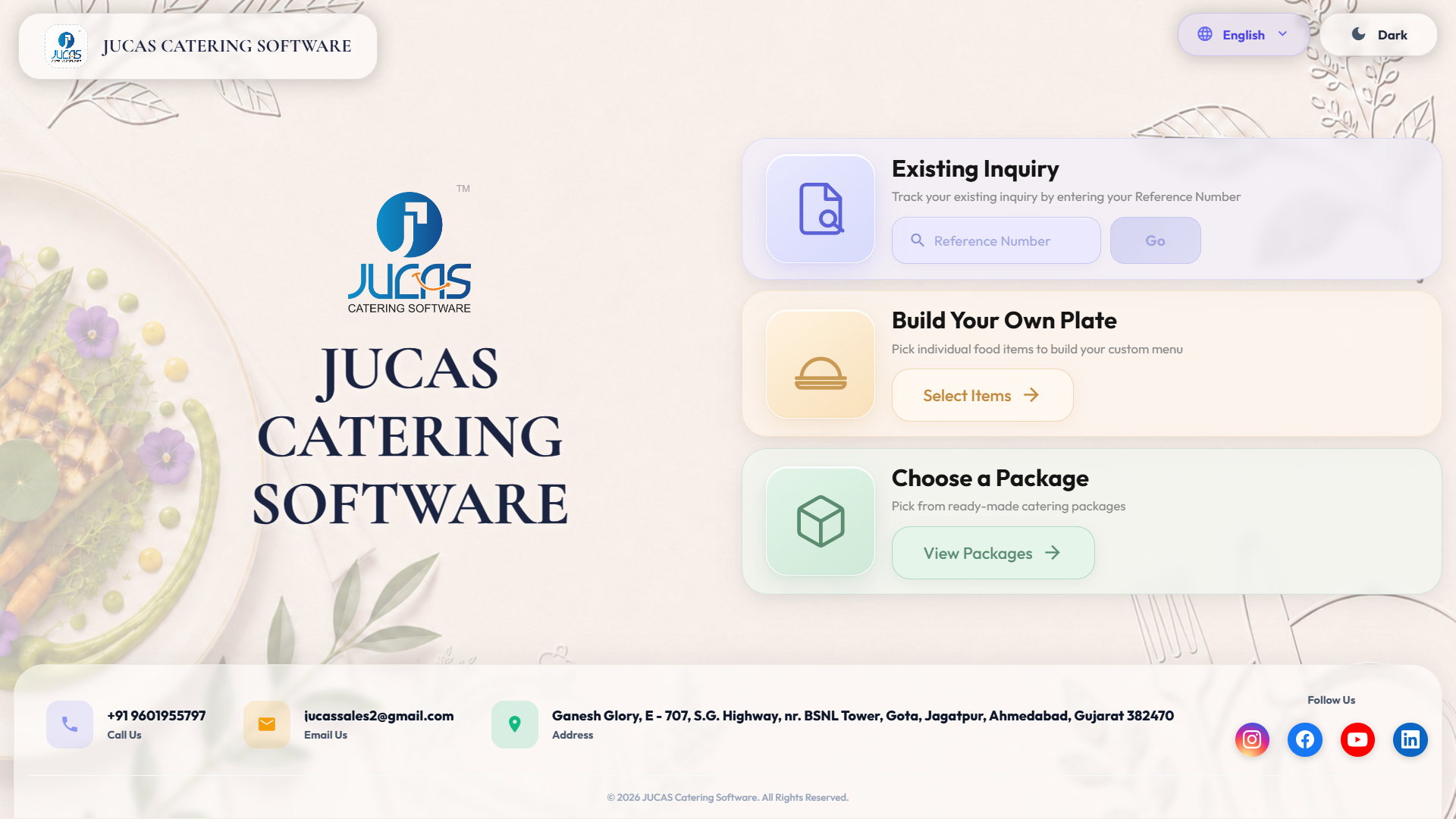
The Jucas Client Menu Finalisation Link is a feature built inside the Jucas catering management platform. Here is how it works from the caterer's side and the client's side.
Step 1: Caterer Creates the Event and Builds the Menu in Jucas
The caterer opens a new event inside Jucas and inputs the event details including date, venue, guest count, and event type. They then build the menu for that event using the Jucas menu library, selecting items, setting quantities, defining categories such as starters, main course, and desserts, and applying any customisation options they want the client to be able to choose from.
This menu build happens once and is tied to the event record. There is no separate document to create, no Excel sheet, and no typing the same information into two different places.
Step 2: Caterer Generates the Client Link
Once the menu is ready for client review, the caterer clicks a single button to generate a unique, secure link for that event. This link is exclusive to that client's event and cannot be used to access any other order or account information.
Step 3: Caterer Sends the Link via Jucas WES
The caterer sends the link to the client directly from within Jucas using the WES (WhatsApp, Email and SMS) communication feature. The client receives the link on whichever channel they prefer. No manual copy-paste into a separate messaging app is needed. The send action and the timestamp are both logged in the event record automatically.
Learn more about how the WES feature works at myjucas.com/features/whatsapp-email-and-sms-wes.
Step 4: Client Opens the Link and Reviews the Menu
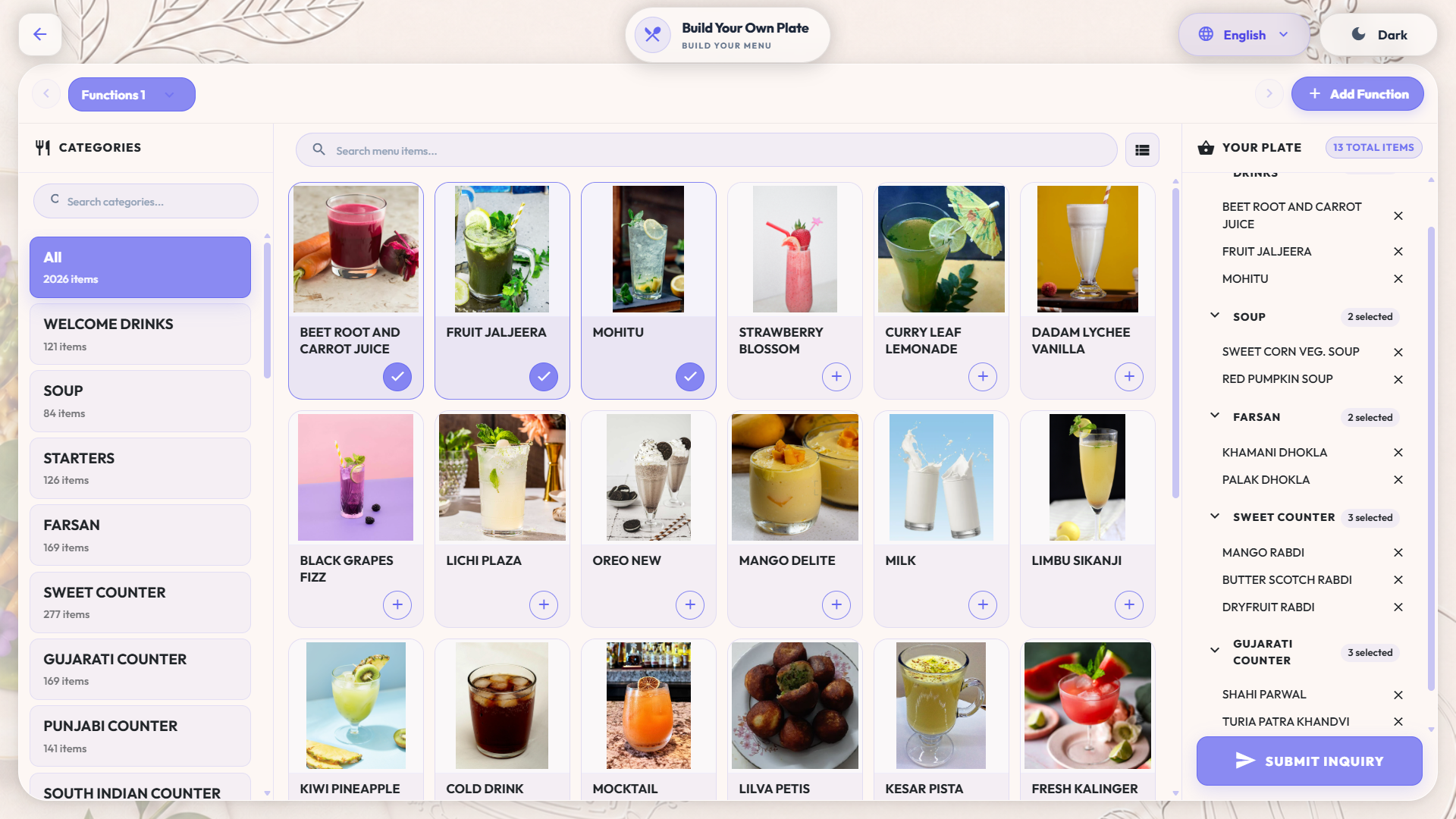
The client taps or clicks the link on their phone or laptop. They see a clean, professionally presented view of their event menu. The layout is easy to read on mobile, with items clearly grouped by category. There is no login required. There is no app to download.
The client can scroll through every section, see what has been prepared for their event, review any options the caterer has made available to them, and make changes within the permissions the caterer has set. For example, a caterer can allow the client to select between two starter options without allowing them to change the main course, which has already been agreed upon.
Step 5: Client Submits the Confirmed Menu
When the client is satisfied with the menu, they submit it using a single confirmation action. The finalised menu is transmitted back to the caterer's Jucas dashboard instantly. The event record is updated with the confirmed selections. No manual entry is required.
Step 6: Order Flows Into Production Planning
Once the client confirmation is received, Jucas automatically links the finalised menu data to the relevant downstream workflows. Raw material calculations are updated based on the confirmed items and guest count. Kitchen team schedules can be aligned to the confirmed menu. Counter name plates can be generated directly from the confirmed selections. Billing is prepared from the same confirmed data.
Key Features of the Jucas Client Menu Finalisation Link
1. Secure, Event-Specific Link Generation
Each link generated by Jucas is unique to a single event. It cannot be used to access another client's information, and it expires after the confirmation is submitted or after a set time window defined by the caterer. This ensures that client data remains private and that links cannot be shared to access order information from other events.
For catering businesses handling sensitive corporate or wedding client data, this level of access control is important. It allows the caterer to extend a self-service experience to clients without opening up their operational systems to outside access.
2. Mobile-Optimised Menu Display
The client-facing menu view is fully optimised for mobile devices. Given that most clients in India open WhatsApp links on their phones, the menu layout is designed to be readable and easy to navigate on a small screen. Categories are collapsed and expandable. Items display clearly with names, descriptions, and any images the caterer has added to the menu library.
This design removes the friction that comes when a client is sent a PDF or Excel file they have to zoom into and scroll through sideways on their phone.
3. Configurable Client Permissions
Caterers can control exactly how much the client can change within the menu link. Options include:
- View only: The client can see the proposed menu but cannot make changes. This is useful for final approval of a menu that has already been verbally agreed.
- Selection within options: The client can choose between pre-defined alternatives for specific courses. For example, they can pick between two dessert options but cannot add new items.
- Full customisation within bounds: The client can add, remove, or substitute items within a defined list. This is useful for events where the client has strong preferences and the caterer wants to give flexibility without losing control of what can be delivered.
This permission structure ensures that caterers do not receive confirmation of items they cannot actually produce or deliver, while still giving clients a meaningful sense of control over their event menu.
4. Real-Time Confirmation Notification
The moment a client submits their confirmed menu, the caterer receives an instant notification inside Jucas and through their preferred channel. There is no need to follow up with the client to check if they have reviewed the menu. The system handles that loop automatically.
This also means the caterer always knows the exact status of every event's menu at any point in time. Events where the client has not yet confirmed are clearly visible in the dashboard, and follow-up reminders can be sent to the client directly from within Jucas.
5. Direct Integration with Raw Material Calculator
Once the client confirms the menu, Jucas automatically recalculates the raw material requirements for the event based on the confirmed selections and the final guest count. The caterer does not need to re-enter the menu data into a separate calculation sheet or update the procurement list manually.
This integration is one of the most operationally significant aspects of the feature. It removes a step that, in manual workflows, is a frequent source of purchasing errors. The connection between what the client ordered and what the kitchen needs to prepare is made automatically, with no human involvement required between those two points.
6. Audit Trail for Every Menu Version
Jucas maintains a complete record of every version of the menu that was shared with the client, when it was sent, when it was opened, and what changes were made before final confirmation. This audit trail is available inside the event record and can be referenced in the event of any dispute about what was agreed.
For high-value events such as large weddings or corporate dinners, this documentation is valuable both for internal quality control and for client-facing accountability. Instead of scrolling through a WhatsApp conversation to find out what was agreed three weeks ago, the caterer can pull up the complete menu history from the event record in seconds.
Before vs After: Menu Confirmation Process Comparison
StageManual ProcessWith Jucas Client Menu LinkSharing the menuPDF via WhatsApp or printed copySecure link sent via WES in under 2 minutesClient reviewClient reads PDF on phone, unclear layoutClean mobile-optimised menu viewClient changesWhatsApp messages, calls, voice notesSelections made directly on the linkRe-entry of changesManual update by office staffAutomatic, no re-entry requiredConfirmationVerbal or message acknowledgmentDigital submission with timestampKitchen updateManual briefing from updated documentAuto-linked to raw material calculatorAudit trailWhatsApp history, easy to losePermanent event record in JucasAverage time to confirm2 to 5 days, 5 to 15 messagesSame day, 0 follow-up messages
Who Benefits Most from This Feature
Wedding caterers managing large families where multiple people have opinions and changes arrive from several directions at once. The link gives the primary contact a single place to gather and submit all decisions, reducing the number of people the caterer has to manage directly.
Corporate caterers handling repeat clients who order regularly from a fixed menu. The link allows the client to confirm their standard selections quickly, with minimal interaction required for routine bookings.
High-volume catering businesses running 50 or more events per month where the overhead of manual menu confirmation compounds into hundreds of hours of wasted admin time.
Catering businesses with a small office team where every hour saved on back-office coordination directly increases the number of events the business can handle without additional hires.
For businesses looking to scale from managing 50 events per month to 200, read the guide on how to scale a catering business to understand where process automation fits into that growth path.
Real Operational Impact: What the Numbers Look Like
For a catering business handling 80 events per month, the practical impact of the Client Menu Finalisation Link breaks down as follows.
Each event that previously required an average of 45 minutes of back-and-forth to confirm the menu now requires under 5 minutes. At 80 events per month, that is a saving of approximately 53 hours per month on menu confirmation alone.
Correction-related errors, which previously affected an estimated 10 to 15% of events (wrong quantity, missed item, incorrect substitution), drop to near zero because client selections are captured digitally without re-entry.
Time from client inquiry to confirmed menu shortens from an average of 3 to 4 days to same-day or next-day confirmation in most cases. This speed improvement directly increases booking conversion rates, as clients who receive fast, professional responses are more likely to confirm.
These numbers are consistent with the broader impact of catering automation documented in the article on automating client proposals and quotes with catering software.
How This Feature Fits Into the Complete Jucas Workflow
The Client Menu Finalisation Link is not a standalone tool. It is one part of the end-to-end event management workflow inside Jucas. Here is where it sits in the broader operational sequence.
Inquiry received through WhatsApp, website, or phone and logged in Jucas CRM.Quotation generated using the Jucas automated quotation system based on menu and guest count.Menu shared via client link for review and confirmation by the client.Confirmation received and automatically linked to raw material calculator, kitchen schedule, and billing module.Event executed with counter name plates auto-generated from the confirmed menu.Invoice raised from the same confirmed data, GST-calculated, and sent to the client via WES.Payment tracked inside the Jucas finance module.
Every step connects to the next without any manual data transfer. The caterer enters information once, and the system carries it through the entire event lifecycle. This is what separates a true catering management platform from a collection of disconnected tools.
Frequently Asked Questions
Does the client need to create an account to access the menu link?No. The client opens the link directly and can review and confirm the menu without registering for any account or downloading any application.
Can the caterer control which items the client can change?Yes. The caterer sets the permission level before generating the link. Clients can be given view-only access, selection-between-options access, or broader customisation access depending on what is appropriate for that event.
What happens if the client wants to make changes after confirming?The caterer can open the event record in Jucas, make updates, and generate a revised link for the client to review and reconfirm. The full version history of all menus shared for that event is retained in the system.
Does the confirmation link to billing and kitchen planning automatically?Yes. Once the client confirms, Jucas updates the raw material calculator and links the confirmed menu to the event's billing and production workflow without any manual re-entry by the caterer.
Conclusion
The back-and-forth menu confirmation process is one of the most persistent sources of wasted time and avoidable errors in catering operations. It is also one of the most solvable.
The Jucas Client Menu Finalisation Link removes the manual loop entirely. Caterers send one link. Clients confirm directly. The data flows straight into production planning, inventory, and billing without anyone typing the same information twice.
For catering businesses handling more than 20 events per month, the time and error savings from this single feature alone can justify the cost of the entire platform. For businesses managing 100 or more events, it is the difference between an operation that scales cleanly and one that breaks under the weight of its own admin overhead.
If you want to see the Client Menu Finalisation Link in action alongside the full Jucas workflow, book a free demo at myjucas.com/book-a-free-demo. The demo takes 30 minutes and shows you exactly how the feature fits into your specific event management process.
TABLE OF CONTENT